MaxPreps: High School Sports
4.22.36KReviews
Analysis ByAppCompare
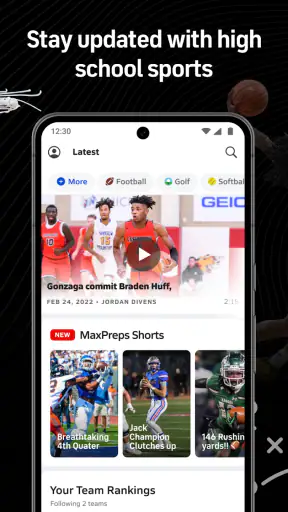
I use MaxPreps: High School Sports when I want one practical place to follow school athletics instead of jumping between team pages, social posts, and scattered score updates. It is a sports app from MaxPreps Inc, focused on high school competition, with scores, schedules, and athlete information at the center of the experience. The app is free, rated for Everyone, and has built a sizeable audience, with more than 500 thousand installs and an average rating of 4.2 from roughly 9.8 thousand ratings.
That description sounds simple, but the real value becomes clearer when you use it as a repeatable routine rather than opening it only when you suddenly remember a game. I found it most useful for checking what is happening around a school, following a particular team, and keeping athlete information close at hand during a season. It is not trying to replace a full professional sports platform. Its strength is narrower and more useful: bringing high school sports details into a format that is easier to revisit.
How I use MaxPreps as a dependable sports routine
Starting with the right school, team, or athlete
The first important habit is resisting the urge to browse randomly. High school sports can involve several teams, age groups, genders, and seasons under the same school name. I get better results when I begin with the exact school or team I care about, then use that page as my starting point for schedules and scores. This avoids the common mistake of checking a similarly named school or following the wrong level of competition.
For a parent, that might mean opening the app before leaving work, locating the child’s team, and checking the next listed event rather than relying on an old message in a group chat. For a student, it can mean checking recent results before a match or reviewing the schedule when planning transport. For a supporter, the same approach makes it easier to build a small personal routine around one school instead of scrolling through unrelated sports.
I also think it helps to separate three questions: what happened, what is next, and who is involved. Scores answer the first, schedules answer the second, and athlete information answers the third. Keeping those purposes distinct makes the app feel less cluttered and reduces the temptation to treat every screen as a news feed.
Why the schedule is more useful than a single score
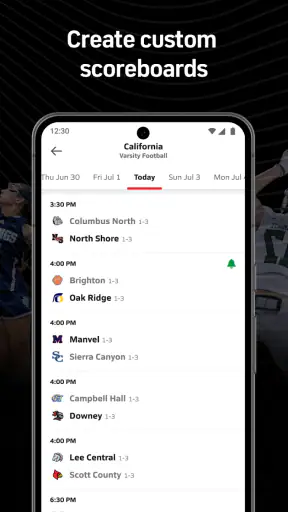
A score is satisfying when you are looking for a result, but the schedule is where the app becomes useful for everyday planning. I use it to look ahead before a busy week, especially when several events may affect rides, attendance, or weekend plans. Checking the schedule in advance is more reliable than waiting for a reminder from another person, although I still treat any sports schedule as something worth checking again near the event.
One practical workflow is to review upcoming events at the beginning of the week, then return shortly before the day of the game. The first visit gives me the broad picture; the second catches any information that may have changed in the meantime. This two-step habit is better than opening the app once and assuming the first view will answer every planning question.
The app also works well as a quick pre-game reference. If I am heading to a school event, I can confirm the matchup and timing without searching the web again. That may sound like a small convenience, but it matters when the information is needed while moving between work, school, and family responsibilities.
Using athlete information without losing the team context
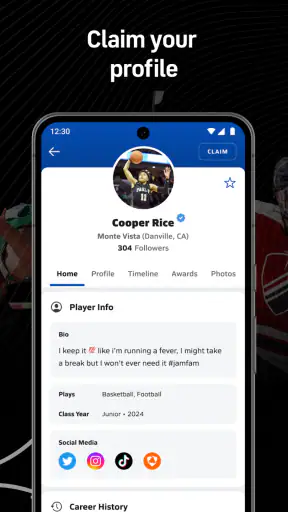
Athlete pages can be useful when you want to understand who is connected to a team, but I prefer to reach them through the relevant school or sport rather than treating individual profiles as isolated pages. The team context gives the information more meaning: you can connect a player with the season, the school, and the competition instead of looking at a name without knowing where it fits.
This is especially helpful for relatives and supporters who follow more than one athlete. Rather than trying to remember every schedule manually, I use the app to move between the people and teams that matter to me. The trade-off is that this requires a little organization on my part. If I keep opening random profiles, the experience becomes less efficient; if I decide in advance which teams and athletes I actually care about, it becomes much easier to manage.
A realistic game-day example
Imagine a Friday when a student has an evening game and a family member wants to attend, but nobody is certain whether the event begins early or later. I would open the app, go to the school or team, check the upcoming schedule, and then use the same area to confirm the opponent. If the family also follows another team, I would check that schedule before leaving to avoid a conflict.
After the event, I would return for the result rather than searching through social media posts. If the score is available, it gives the family a shared reference point. If the app is being used to follow an athlete, I would then check the related profile or team information. The important detail is the order: schedule first for planning, score afterward for confirmation, athlete information when I need context.
Settings and habits worth checking early
I would spend a few minutes reviewing the app’s available settings and personal preferences before relying on it throughout a season. The most useful settings are the ones that reduce repeated searching: choose the teams, schools, sports, or athletes you genuinely follow, and avoid filling the experience with every possible interest. A focused setup makes the app feel like a personal dashboard instead of a general directory.
I also recommend checking how alerts are handled on your device. Sports notifications can be helpful, but too many can turn a useful tool into background noise. I prefer to keep attention on the events that affect my plans and use manual checks for everything else. If you are following several teams, this becomes particularly important because a broad setup may produce more interruptions than useful information.
Another sensible check is the account and display behavior after installing the app. Make sure the selected school, sport, and team are the ones you intended before building a routine around them. This is not an advanced trick; it is simply the best way to prevent a small setup error from producing a week of irrelevant scores and schedules.
Shortcuts that make repeated checking faster
Experienced use is mostly about reducing unnecessary steps. I keep my main team or school as the first place I return to, then use the schedule for forward planning and scores for quick results. I do not start from a broad sports category every time. That extra browsing is fine when exploring, but it is inefficient when I already know what I want.
A second useful pattern is checking at natural moments rather than constantly refreshing. I look before a planned trip, after an event should have ended, and when I am preparing the next day. This gives the app a clear job and prevents it from becoming a distraction. It also makes it easier to notice whether the information is current enough for my particular use.
When following multiple sports, I group my checks by purpose. I might review all upcoming schedules together, then look at completed scores later, instead of switching back and forth between teams without a plan. This simple separation keeps the process quicker and helps me remember which information still needs attention.
There is also a useful distinction between discovery and confirmation. I use the app to discover upcoming games and relevant athlete information, but I confirm important travel plans through the school or team’s own communication when necessary. MaxPreps is a convenient sports reference, not a substitute for every official announcement a school may send.
Where the app is strong compared with usual alternatives
The usual alternative is a mixture of search results, school websites, social media, text messages, and paper or digital calendars. That mixture can work, but it spreads the information across too many places. MaxPreps gives high school sports a more consistent home, particularly when I want scores, schedules, and athlete details together.
Compared with a general sports app, its focus is more relevant if your interest is local school competition rather than major professional leagues. A broad sports service may be better for national headlines, live coverage of famous teams, or a wide range of sports news. I would not install MaxPreps expecting it to function like a professional league scoreboard.
Compared with a school’s own website, the app can be quicker for people who follow more than one school or sport. The school website may still be the better authority for announcements, venue changes, forms, or administrative details. My preferred approach is to use MaxPreps for the recurring sports view and the school’s own channels for information that affects logistics or participation.
The limits that matter in real use
The biggest limitation is that the app’s usefulness depends on the information being available and maintained for the specific school, team, and sport you follow. High school athletics are varied, and coverage may not feel equally complete everywhere. I would test the teams that matter most to me before making the app my only source of information.
Another limitation is that a schedule does not automatically solve every planning problem. A listed event may still require details about the venue, entrance, parking, weather, or last-minute changes. I use the schedule as the starting point, then look elsewhere when the decision involves travel or a time-sensitive commitment.
The experience can also become less comfortable if you follow too broadly. Selecting every sport at a school may sound thorough, but it creates more information to sort through and makes the important events harder to spot. The better trade-off is selective following: keep the teams and athletes that matter, and search manually when curiosity takes you outside that group.
People who want deep live analysis, extensive commentary, or a complete professional-style statistics experience may find the app too focused on its core purpose. I see that as a boundary rather than a flaw. It is most convincing when used to organize high school sports information, not when forced to become an all-purpose sports media service.
Who should use it and who should skip it
I would recommend it to parents, students, relatives, coaches, alumni, and local supporters who regularly follow school sports. It is particularly useful for anyone who needs a repeatable way to check upcoming events and recent results without maintaining several separate bookmarks. The free price also makes it easy to try without turning the decision into a financial commitment.
I would be more cautious if you only watch professional or college sports, because the app’s high school focus may not match your interests. I would also skip it if you need official school administration information more than sports schedules and scores. In that case, the school’s own communication channels are likely to be more important.
Families following several children can benefit from its combination of team and athlete context, but they should invest time in narrowing their choices. A casual supporter who follows one local team may find the app simple and practical. A person who wants constant news, commentary, and broad sports entertainment may prefer a larger sports platform.
Compatibility, upkeep, and day-to-day reliability
The app was released on December 4, 2015, and the current Android version is 5.6.6-Prod-260820, requiring Android 8.0 or later. That makes the operating-system requirement important to check before installing on an older device. I would also keep the app updated when possible, especially if it is part of a regular game-day routine.
MaxPreps: High School Sports has a 4.2 average and about 2.4 thousand written reviews, which suggests a generally positive reception while still leaving room for different experiences across schools and regions. I would interpret that sensibly: the app can be very useful for a well-covered team, but no rating can guarantee that every local schedule or athlete page will meet the same expectations.
Because it is rated for Everyone, it is suitable as a family-facing sports reference. Still, younger users may need guidance about which teams or athlete pages to follow and how much personal information they choose to engage with. The most comfortable experience comes from using it with a clear purpose rather than browsing without boundaries.
My verdict after building a repeatable workflow
MaxPreps: High School Sports works best when I treat it as a focused high school sports organizer. I open it with a question, choose the correct school or team, check the schedule or score, and then move to athlete information only when I need that extra context. That workflow is faster and clearer than wandering through every available section.
The strongest habit is simple: follow less, check with purpose, and use the app alongside official school communication. With that approach, the service can save real time for families and supporters while avoiding the notification clutter and uncertainty that come from trying to track everything at once.
My final recommendation is positive for anyone whose sports life revolves around high school teams. It is free, focused, and more convenient than piecing together information from unrelated sources. I would not make it the sole authority for urgent logistics, and I would choose another app for professional sports coverage or deep analysis. But for scores, schedules, and athlete information in a school-sports setting, it earns a place in my regular routine.
FAQ
What is MaxPreps: High School Sports used for?
MaxPreps is designed for following high school sports in the United States. The app lets you check team schedules, scores, rankings, rosters, player statistics, news, photos, and game results across many sports. It is useful for students, parents, coaches, athletes, and fans who want one place to keep track of local teams and competitions.
Which sports and schools are covered by MaxPreps?
MaxPreps covers a wide selection of high school sports, including football, basketball, baseball, softball, soccer, volleyball, wrestling, lacrosse, track and field, and more. Coverage can vary depending on the school, state, sport, and whether teams or coaches have submitted current information. Some areas may therefore have more complete schedules and statistics than others.
Can I follow a specific school, team, or athlete?
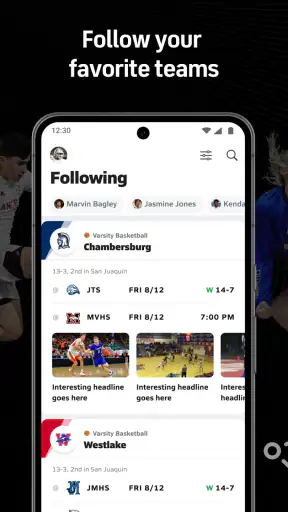
Yes. After installing MaxPreps, you can search for schools, teams, and athletes and save favorites for quicker access. Following a team makes it easier to view upcoming games, recent results, rankings, news, and available statistics. The amount of athlete information depends on the sport and the data provided by the school, coach, or authorized contributors.
Does MaxPreps provide live scores and game updates?
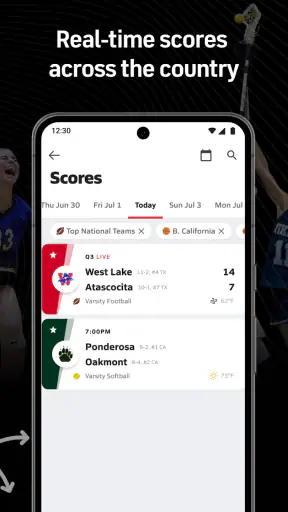
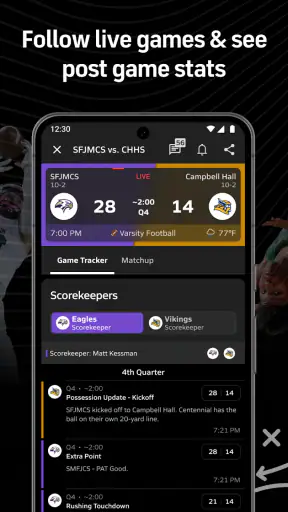
MaxPreps can provide score updates, schedules, final results, and other game information, but the availability and speed of updates depend on the event. Some scores may be entered during a game, while others appear only after the contest ends. For this reason, the app is helpful for tracking competitions, although it should not always be treated as an instant live broadcast.
Is MaxPreps free to download and use?
MaxPreps can generally be downloaded and used without paying for basic features such as browsing teams, schedules, scores, rankings, and selected statistics. However, certain content, enhanced features, or subscription options may require payment, and availability can change over time. Before downloading, review the current App Store or Google Play listing to confirm pricing, in-app purchases, and supported devices.
Pros
- Covers numerous high school sports
- teams
- schedules
- and player profiles.
- Live scores and game updates help families follow events remotely.
- Personalized team and sport tracking keeps relevant news in one place.
- Roster and stats tools are useful for athletes
- coaches
- and supporters.
- Includes rankings and records for comparing teams across regions.
Cons
- Coverage and stat accuracy can vary between schools and local contributors.
- Some features may require account creation or additional permissions.
- Notifications can become frequent when following several teams or sports.
- Smaller schools may have limited profiles
- schedules
- or historical data.
- Advertising and promotional content may affect the browsing experience.